| |||||||||||||||||||||||||||||||||||||||||||||||||||||||||||||||||||||||||||
NOKIA E71
Spesifikasi Detil :
........
BlackBerry Torch 9800 on AT&T
New BlackBerry Torch 9800 on AT&T inspires & brings together your BlackBerry smartphone with a new touch, the first BlackBerry with a touchscreen, slide keyboard design & OS. See the new BlackBerry 9800 Slider.
RIM flirts with new designs, like any phone manufacturer. Though we think of the wide QWERTY bar when we conjure up the BlackBerry, RIM has released the all touchscreen Storm and Storm 2, the short-lived BlackBerry Pearl flip and the skinny and successful semi-QWERTY Pearl line of phones. The Torch, at least for those who don't despise touch screens (are there any touch screen haters still out there?), is one of RIM's brightest ideas. You get that wonderful hardware QWERTY keyboard and a capacitive touch screen. I know some of you actually like the Storm's SurePress moving display, but it's safe to say it wasn't a mainstream hit (no one copied it, did they?). Capacitive displays are the bee's knees: they're easy to use, allow multi-touch and are found on most Android phones and all iPhone models. If you're a 'Berry person, you know that it's hard to beat a good hardware keyboard for serious messaging. But nobody wants a tiny display and RIM's raison d'etre isn't jumbo phones, so we need a slider to allow room for both. Voila: the pocketable, QWERTY touch screen BlackBerry.
The design isn't the only new stuff here: this is the first smartphone to run the new BlackBerry 6.0 operating system. While touch was cobbled onto OS 5 for the Storm line of phones, OS 6 has been redesigned for touch. That doesn't mean your beloved keyboard shortcuts or excellent optical d-pad went away-- they're still there and RIM will release OS 6 non-touch BlackBerry phones. But the menu structure has been greatly simplified, icons and items are large enough for touch and the home screen has several touch-aware hot zones that bring massive device control, information and applications together. OS 6 still feels very BlackBerry, but it's modern, easier to use and more pleasing to look at. The OS replaces the lamentable old 'Berry browser with a fine Webkit browser (the iPhone, webOS and Android all use Webkit). That doesn't mean RIM's got it all: there are still no 3D APIs for games. There's no direct MS Exchange full PIM sync out of the box (you'll need BES for that, or rather your IT guy will need it).
Design and Ergonomics
Though there's never been a BlackBerry with this form factor, the Torch is easily recognizable as a BlackBerry. The hallmarks of 'Berry design are there: a chrome front surround, the classic BlackBerry shape and the rubberized sides. Some reviewers complained that they Torch isn't thin enough. QWERTY sliders aren't thin, with the exception of the Motorola Droid. Though the 5.3 ounce Torch 9800 feels weighty and chunky in the hand, it's not all that fat. It's just a hair thicker than the EVO 4G and Motorola Droid X's thicker end (the X tapers). The super-skinny Samsung Captivate and iPhone 4 are thinner. The Torch fits reasonably well in a pocket and it feels very durable.
Nokia Nuron 5230 review
The Nokia 5230 Nuron for T-Mobile isn't the most advanced or fastest smartphone on the market, but budget-conscious customers will find an incredible deal here.
The Nuron (Nokia Nuron 5230) is a Symbian OS 9.4 smartphone running Nokia's S60 5th Edition software. If you're already a Nokia S60 user, you'll likely feel right at home, even if you've never used the touch screen 5th Edition version. The icons, menus and metaphors are largely the same. That's great for familiarity, but the user interface still isn't ideally touch optimized as it is with the iPhone 3GS and Android (two mobile operating systems that were designed from the ground up for touch rather than being ports of d-pad centric product lines). Since Nokia has released six 5th Edition phones, starting with the high end Nokia N97, we'd hoped they'd have evolved the UI more. But the new ^Symbian phones are coming later this year, and we assume Nokia didn't want to spend much more development time with S60.
What exactly bothers us? It's not just the resistive touch screen, which has its good points: you can use it with gloves and fingernails and it's more precise. Yes, you do have to press a bit harder than on the iPhone or Motorola Cliq XT, but it's not a wretched task. What we don't like is that you actually have to use skinny scroll bars in some places, and those are certainly not finger-friendly and are terribly dated. In some cases you have kinetic scrolling and in others you don't. Since this isn't a capacitive display, there's no pinch zooming. In some places you must single-tap on an item and in other places a double-tap is required. Good gosh, these kinds of things should have been sorted out long ago. The on-screen keyboard isn't the easiest to use, but once you remember it's not capacitive and that you must pay attention and precisely tap the key you want, it's passable.
But there are things to like as well: once you get used to how the UI works, it's easy enough to fly around the screen and get things done. It's a fun phone to use, though it gets sluggish at times running on an ARM11 434MHz processor with a lean amount of available RAM. The smartphone is compact and very light at 3.98 ounces, and it makes the Cliq XT look like a battleship.
Like the Nokia 5800 and 5230, the phone's hardware is laid out a bit differently from most phones. Nokia ships the phone with a sticker over the display that lets you know that the SIM card slot and microSD card slots are under rubber doors on the side of the phone instead of under the battery door.
The Nuron has a screen lock slider on the right, a feature common in recent Nokia phones. It's easy to operate and saves you from the two step touch the power button then slide on the screen to unlock method that we find tedious. There are dedicated hardware call send and end buttons and a center key that opens up the programs window. These are mechanical buttons and work easily. A touch sensitive button lives at the top right corner above the display and this launches a shortcut bar to the multimedia apps. There's a standard 3.5mm stereo jack up top (music is one of the phone's strong points) and a dedicated camera button. The volume buttons are on the right and they control everything except ringer volume (you must use the Profiles settings to change the ringer volume which seems a little silly).
........
T-Mobile Motorola CLIQ XT
Motorola Cliq XT The keyboard-less counterpart to the Motorola Cliq on T-Mobile brings its own special sauce in the form of custom multimedia applications, a higher resolution camera and Swype on-screen keyboard input. The Cliq XT has a 3.1" HVGA capacitive touch screen and it runs on a 528MHz Qualcomm CPU. Like the Cliq and Backflip, it runs MOTOBLUR social networking software on top of Android 1.5. The Cliq has a GPS that works with Google Maps and Telenav, MS Exchange support, plenty of social networking integration, WiFi and Bluetooth. The 3G Cliq XT has excellent voice quality and a pretty decent camera.
The Cliq XT, like the Cliq is a bit outclassed among Motorola's Android offerings when it comes to looks. The Motorola Droid is of course a high end phone and it looks the part. Even the Moto Devour's casing is metal and the Motorola Backflip on AT&T is made of alloy and plastics that speak of quality. Neither the Cliq or the Cliq XT try to dress it up: they're 100% plastic phones. The Cliq XT is the odd man out, neither resembling the small, rounded Cliq and Backflip nor sharing the angular, modern design of the Droid and Devour. In fact, it looks more like an Asian market phone, and if the branding were gone, our first guess would be that Samsung made this phone.
The Cliq XT is a bar style touch screen phone that's surprisingly large given the relatively small 3.1" display. It's almost as big as the high end, high res Nexus One whose screen is a half inch larger. All that space allows for large buttons and an oversized trackpad that sit below the display. These are mechanical buttons that go "click" rather than touch sensitive buttons: a relative rarity on Moto Android phones. Once you become accustomed to a good touch sensitive button implementation, it's hard to go back to mechanical buttons, especially ones with lots of travel like the XT. The trackpad works like a tiny version of a laptop trackpad, and given the small size, it's not that easy to use (but easier than the super-tiny trackpads we've seen on some Samsung Windows Mobile phones).
Like all Android phones, the Cliq XT has an excellent webkit web browser, email (POP3, IMAP and Gmail) and it can sync calendar and contacts with Google's services. MOTOBLUR adds good MS Exchange support (email, calendar and contacts) and contacts integration with Facebook, Twitter and MySpace. You can download free and paid applications via the Android Market application on the phone and it has support for Amazon's MP3 store. We particularly like the custom music and video application that can download album covers and lyrics on the fly. It integrates with TuneWiki and also comes with SoundHound (a free music ID service). The application also handles music video playback (YouTube and GoTV channels), FM radio (a 3.5mm standard stereo headset is required but not included) and locally stored video playback. Given vanilla Android's bland handling of multimedia, the Music app is a blessing.
Camera and GPS
Like the Backflip, the Cliq XT is a mid-priced Android phone with a better than middling camera. The 5 megapixel camera with autofocus lens takes nice shots, though they're a bit over-sharpened. Colors are saturated and natural and images don't look terribly over-processed other than the sharpening. The camera can also shoot video, though at a less impressive CIF 352 x 288 pixel resolution. The camera can geotag images and the GPS managed to get a fix quickly.
........
BlackBerry Bold 9650
BlackBerry Bold 9650 The Bold 9650 replaces the BlackBerry Tour as Sprint and Verizon's high end non-touch screen model with world roaming. The Bold closely resembles its GSM sibling the Bold 9700 and it's quite compact. It has EV-DO 3G for fast data, GSM roaming capabilities, a 480 x 360 display, an optical trackpad rather than a trackball, GPS and WiFi too.
BlackBerry Bold 9650 - Research In Motion (RIM) April 2010 introduced the BlackBerry Bold 9650 smartphone in the latest generation BlackBerry is spelled Bold.Ponsel Advanced, powerful and feature-rich BlackBerry Bold 9650 is a smartphone for the global CDMA subscribers
The Bold offers a few key improvements over the BlackBerry Tour, and they're likely good enough reasons to upgrade from an older BlackBerry. However, if you're a Tour owner, the improvements probably don't warrant an out of cycle upgrade. New goodies in the Bold 9650 include an optical trackpad, double the RAM and the addition of WiFi. The added RAM makes for a speedier 'Berry, even though the CPU isn't any faster. The optical trackpad means no more worrying about balky trackballs that fall prey to pocket lint and dust.
As we noted with the BlackBerry Bold 9700 on T-Mobile and AT&T, the slightly higher than iPhone 3GS resolution crammed into a tiny 2.8" display makes for tiny text, particularly in web pages. We found we had to zoom in at least 2 levels before we could easily read text on non-mobile sites and that our eyes were feeling mighty tired after a half hour of casual web surfing.
The keyboard is the standard Bold style with the wave-sculpted keys vs. the flat keys on the Curve line. I do find it easier to type quickly on the wave keyboard since it prevents finger slips and provides superior tactile feel.
Much ado has been made of the raised buttons above the keyboard for call send, call end, back and the menu key. Instead of sitting lower than the keyboard keys as they do on the Bold 9700, they're the same height as the key tops. Honestly, it's caused me no problems but from a tactile standpoint, the raised buttons do make it harder to sense where the keyboard ends.
In contrast, the trackpad is a definite improvement over the trackball: it's equally as responsive and an extension of your mind as was the trackball but it doesn't get stuck or mucked up.
Phone and Data
The BlackBerry 9650 has excellent voice quality on both incoming and outgoing ends and as expected it has the best push email experience on the planet. Reception on our unit was flaky, and bounced around quite a bit while our other Sprint phones remained stable. Overall 1x (voice) and 3G (EV-DO Rev. A) reception was middling in stark contrast to GSM Bold models that have incredibly good reception. Download speeds over EV-DO Rev. A were very good, though that fast data connection didn't do wonders for web browsing. Why? RIM's web browser is slow. It still has trouble rendering some HTML desktop sites and Javascript adds about 10 seconds to page load times on full HTML sites. You can turn off Javascript in prefs, but you lose useful things like dynamically generated content and advanced menus. We can't wait for BlackBerry OS 6 and the new Webkit-based web browser!
If cellular data doesn't excite you, the Bold has WiFi too. If you're in a non-3G coverage area it's most welcome when downloading apps from BlackBerry App World.
The Bold 9650 is a world phone: it runs on Sprint's CDMA network here in the US and on GSM abroad (Europe and Asia are mainly GSM). It's a quad band GSM world phone and it has 3G HDPA on the 2100MHz band used in Europe and in some areas in Asia. The phone won't work on US GSM networks (they're locked out) and Sprint says that you should call to enable GSM roaming 24 hours in advance of your trip. There's a SIM card slot under the battery with a Sprint-supplied SIM card pre-installed.
Motorola droid x
Motorola Droid X...Motorola was no one hit wonder with the original Moto Droid on Verizon. The Droid X, their second Android superphone is good enough to earn our Editor's Choice Award, and it shows great improvement from the already solid Droid. The Droid X is very slim slate design phone with a monster high res 4.3" capacitive multi-touch display, 1 GHz CPU and an excellent 8 megapixel camera with dual LED flash. It has the usual 3G EV-DO Rev. A with mobile hotspot feature, WiFi 802.11n , Bluetooth and a GPS that works with Google Maps. The X runs Android OS 2.1 with a smattering of Moto custom software.
The original Droid made a powerful statement. Actually, make that statements, plural: for Motorola, it was the largest single affirmation that it was going all-in with Android (after having already released the far less memorable midrange CLIQ on T-Mobile) and that it could play in the very highest rungs of the smartphone elite. For Verizon, the Droid was the carrier's very first Android device, period -- announced to great fanfare in collaboration with Eric Schmidt and crew -- serving as a pretty spectacular exit from the Windows Mobile / BlackBerry doldrums that the carrier's smartphone lineup had historically suffered. By almost any measure, the phone went on to serve its purpose; it let customers (and potential customers) know that Verizon could release a "cool" phone, and they responded. The Droid's an unqualified success. Today, Verizon's involvement in Android has never been greater, and Motorola -- by all appearances, anyway -- seems to be on its way back from the brink.
Time stops for no phone, though, and we're now halfway through 2010. Motorola's success as a competitive phone manufacturer is ultimately going to depend not on its ability to produce a single hit, but to produce a never-ending string of hits, each better than the one before it. It's a tall order -- and that's exactly where the Droid X comes into play. Featuring a 4.3-inch WVGA display, 8 megapixel camera with 720p video capture, a reworked user interface, and a significantly improved processor, this phone apes the first Droid in at least one critical aspect: its ability to immediately steal the spotlight from anything else in Verizon's lineup. Specs don't tell the whole story, though, so let's dig in and see what this beast is all about.
........
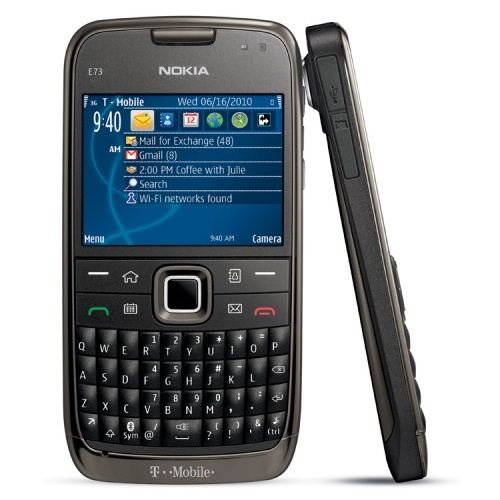
Nokia E73 Mode review
Some two years after its release, there are still plenty of people who'll swear up and down that the E71 is the finest phone Nokia has ever produced -- and for good reason.The Nokia E71 was an iconic phone that even as an unlocked and unsubsidized phone, sold well in the US. Late in its life, AT&T picked it up as the Nokia E71x where it enjoyed modest success though it was long in the tooth by then and a bit overrun with AT&T bloatware. T-Mobile customers, left out of the 3G love nonetheless bought the unlocked E71, especially early in its life when many T-Mobile smartphones still shipped with EDGE 2G data. The phone-loving world waited with great excitement when Nokia announced the E72, the successor to the E71 boasting improved specs and who knows what special sauce Nokia might throw in. By the time the phone made it to the US, again unlocked, in February 2010, it didn't add much to the once-proven E71 formula. It had a better camera, a significantly faster CPU and a slightly newer version of S60 software on top of Symbian OS and nothing new to rave about.
Four months later, T-Mobile US has picked up their version as the Nokia E73 Mode. While Nokia usually goes with a numeric appendage to indicate it's the same phone with different 3G bands (e.g.: Nokia E72-1, Nokia E72-3), this time they've created a new model number for the T-Mo version. The Nokia E73 is basically a Nokia E72 with T-Mobile 3G bands and carrier software (not much carrier software since T-Mobile doesn't muck up their phones with bloatware).
The good news is that you can get a very capable Nokia S60 QWERTY smartphone not too long after the US unlocked release for a very attractive $69.99 with contract. The bad news is that the E73, like the E72, doesn't bring any features to the table that will set the world on fire. The other good news is that the E73 Mode has stunning hardware: a metal back, very solid build, superb keyboard and an incredibly thin design. This is a very, very nice looking and feeling phone. No plastic BlackBerry Curve 8520 here, despite the low price. Kudos to Nokia for finding a way to sell high end hardware at such a competitive price.
The Nokia E73 Mode has a QVGA non-touchscreen display, an optical trackpad, 3G HSDPA, WiFi, a GPS, Bluetooth 2.0 +EDR, an SDHC microSD card slot and a 5 megapixel autofocus camera. It runs on a 600MHz ARM11 CPU with 128 megs of RAM (we'd like more RAM) and 512 megs of flash memory with 250 megs available.
The Nokia E73 Mode is so named because it allows you to create modes to match your lifestyle. This feature has been available on Nokia S60 phones for some time, but it's the first T-Mobile Nokia phone to offer it. With modes you can have a work and home mode with a specific set of home screen shortcuts, ringers and wallpaper. It's handy and unique to Nokia's phones. The E73 is a QWERTY messaging smorgasbord with Nokia's own IMAP/POP3 email client, SMS/MMS and T-Mobile's IM client that handles MSN Live Messenger, Yahoo, AIM, MySpace IM and Gtalk. You can download Nokia's Mail for Exchange client for MS Exchange support as well. The mail client handles HTML email well, but we found email a bit more trying to configure than on BlackBerry phones. Gmail email support is available and you can download Google's S60 sync software too.
........
LG eXpo Review
The LG eXpo is the HTC Tilt 2's competitor on AT&T. While the Tilt 2 features HTC's TouchFLO 3D that makes the smartphone much more fun and modern, the eXpo opts for impressive hardware like the 1 GHz Snapdragon CPU, good 5 megapixel autofocus camera, fingerprint reader and optional pico projector. Both sport a very ample slide-out hardware QWERTY keyboard and an 800 x 480 pixel resistive touch screen. The LG is a bit slimmer and more pocketable than the beefy Tilt 2, but it's still a large phone.
Our gripe with the LG eXpo is the very stylus-centric UI that's mostly vanilla Windows Mobile 6.5 Pro and the relatively small 3.2" display that makes for smaller on-screen targets. It's just not fun and finger-friendly compared to HTC's TouchFLO 3D Windows Mobile phones, Android smartphones and other modern OS phones. This is a business phone first, and fun isn't its prime directive but even LG's S-Class UI doesn't help it out of the doldrums. But for those of you who like Windows Mobile just fine, the eXpo has great appeal since it's currently the fastest US Windows Mobile phone (until the HTC HD2 hits T-Mobile in the spring of 2010). Not to mention the fingerprint sensor for security (remember that feature from HP iPAQ PDAs way back when?) and the optional projector that's great for incredibly portable PowerPoint presentations. Unfortunately, we didn't receive a projector with our phone, so we won't be able to cover that important business feature.
The smartphone's build is solid, and the eXpo looks like a quality piece of hardware, though it's nothing to speak of on the style front. The large QWERTY keyboard is excellent, though we still prefer the offset keyboard on the Tilt 2, which is the best keyboard on the market. Key travel is a bit shallow, and the d-pad likewise lacks travel-- but at least it has one. The d-pad seems to be disappearing from WinMo touch screen phones.
Specs at a Glance
The LG eXpo (don't blame us for the bizarre capitalization) is a Windows Mobile 6.5 Professional phone with a 3.2", 800 x 480 pixel resistive touch screen. It has a slide-out QWERTY keyboard, a 5 megapixel camera with autofocus and a flash, a GPS that works with AT&T Navigator, Bluetooth and WiFi. It has 256 megs of RAM, 512 megs of flash storage and an SDHC microSD card slot that's conveniently located under a door on the phone's side.
Specs:
Display: 3.2" resistive touch screen with haptic feedback and proximity sensor. Resolution: 480 x 800, supports both portrait and landscape modes.
Battery: Lithium Ion polymer rechargeable. Battery is user replaceable. 1500 mAh.
Performance: 1GHz Qualcomm Snapdragon processor. 256 MB built-in RAM. 512 MB Flash ROM.
Size: 4.45 x 2.24 x 0.65 inches. Weight: 4.46 ounces.
Phone: Quad band GSM world phone 850/900/1800/1900MHz bands. 3G HSDPA 7.2 Mbps on AT&T's 850/1900MHz US bands and 2100MHz for use abroad.
Camera: 5.0 MP with autofocus lens and LED flash. Supports AT&T's Video Share one-way video conferencing service.
Audio: Built in speaker, mic and proprietary stereo headphone jack. Voice Recorder and Windows Mobile Media Player 10 included.
Networking: Integrated WiFi 802.11b/g and Bluetooth 2.1 + EDR.
Software: Windows Mobile 6.5 Professional OS. Both standard UI and LG's S-Class UI are available on the device. Internet Explorer 6 mobile, MS Voice Command, Java VM, Windows Mobile Marketplace, Adobe Reader, Sprite Backup and Windows Media Player Mobile. Standard MS mobile software suite: Office Mobile (Word, Excel, PowerPoint and OneNote Mobile),, Email (POP3/IMAP/MS Exchange), File Explorer, PIM suite (contacts, calendar, notes and tasks), SMS/MMS client, BubbleBreaker and Solitaire. AT&T software: AT&T WiFi, AT&T App Center, AT&T Navigator, AT&T Music and trial games.
Expansion: 1 SDHC microSD card slot.
........
LG Fathom Review
Verizon has an impressive smartphone lineup-- from the capable HTC Touch Pro2 to the Moto Droid and Palm Pre Plus, if you want it, it seems they've got it (as long as it's not an iPhone you're after). And that's the LG Fathom's biggest problem; Verizon's selection and even LG's own solid Ally eclipse this Windows Mobile touch screen phone. The specs are good: 1GHz Qualcomm Snapdragon CPU, a high resolution 800 x 480 resistive touch screen, a large hardware QWERTY keyboard, GPS, WiFi and Bluetooth, EV-DO Rev. A and GSM roaming too. But the design is just plain bland as is vanilla Windows Mobile. Yes, it's Windows Mobile Pro 6.5.3, and this is the first US phone to get that .3 tacked to the end, but the changes are marginal. The Windows Start Menu button is enlarged and moved to the bottom of the display as is the once too small "x" close box. Tabs have grown bigger to be more finger-friendly, but the built-in applications' user interfaces are still tiny and stylus-centric.
If you're a Windows Mobile person, you may well like the Fathom since it's fast and stable, but if you're not a hardcore WinMo guy or gal, there are more compelling phones on Verizon's network. For example, the HTC Touch Pro2 (also with GSM) offers the same specs except CPU, and it has a larger display and a more modern and enjoyable TouchFLO 3D user interface. If you're considering Android, Verizon's line is deep with the excellent HTC Incredible, Moto Droid and LG Ally singing their collective siren song. And then there's the Palm Pre Plus running one of the most exciting and fresh operating systems on a mobile phone with excellent Exchange sync built-in.
Since this is bare naked Windows Mobile, you will need a stylus for many things. Thankfully the LG has a stylus silo that's rather ingeniously located on phone's back running horizontally rather than the usual vertical. Though there's a capable hardware keyboard, you can use an on-screen software keyboard everywhere text input is possible and there's an xT9 option.
The hardware keyboard is large and clicky, and it's nearly identical to the Android-powered LG Ally. It's a 4 row keyboard with a dedicated number row, and we found it easy to use, though we disliked having to hit the Fn key to enter a period and comma. The backlighting is bright and the keys are clearly visible in the dark. The d-pad on the right is handy for navigating text precisely without having to whip out the stylus.
LG keeps buttons to a minimum with call send and end buttons and a Windows Start Menu button up front, the power button up top (much better than combining it with the call end key), volume controls on the side, a camera button and a side button for the task manager.
We wouldn't call the Fathom an attractive phone by a long shot. The Ally was innocuous, but not ugly. The Fathom isn't as attractive as the Ally. The front has a rough brushed metal finish and the back is blue-black plastic with a dot pattern. The phone does feel very solid and durable, and the slider is tight with no play.
The display is sharp given the high 480 x 800 resolution crammed into a small 3.2" display. Text is quite small and we prefer larger displays when working at this resolution. The touch screen is remarkably responsive to touch and if we didn't know better, we'd mistake it for a capacitive touch screen. Scrolling is smooth and we had no problem selecting the smallish icons in the Windows program launcher, though tiny web links and drop-down lists are better handled with the stylus.
Specs:
Display: 3.2" resistive touch screen. Resolution: 480 x 800, supports both portrait and landscape modes via accelerometer and keyboard slider. Has ambient light sensor, haptic feedback and proximity sensor.
Battery: Lithium Ion rechargeable. Battery is user replaceable. 1500 mAh. Optional extended 2200 mAh battery available separately.
Performance: 1GHz Qualcomm Snapdragon QSD8650 CPU.
Size: 4.53 x 2.20 x 0.65 inches. Weight: 5.36 ounces.
Phone: CDMA dual band digital with EV-DO Rev. A for data. Quad band GSM for worldwide roaming (Vodafone SIM included, locked to Verizon/Vodafone). 3G HSDPA/HSPA on the 2100MHz band.
Camera: 3.2MP with autofocus lens and LED flash. Can shoot video up to VGA resolution.
Audio: Built in speaker, mic and 3.5mm standard stereo headphone jack. Voice Recorder and Windows Media Player Mobile included. Has speaker independent voice commands and dialing.
Networking: Integrated WiFi 802.11b/g/n and Bluetooth 2.1 + EDR. Bluetooth profiles include headset, hands-free, dial up networking (DUN), A2DP stereo, phone book access, basic printing, object push for vCard and vCalendar, FTP, basic imaging, HID and serial port.
Software: Windows Mobile Professional 6.5.3. Microsoft Mobile Office suite including Mobile versions of Word, Excel, PowerPoint), Internet Explorer, and Outlook. Also included are the standard Windows Mobile calculator, messaging, Bing search, Windows Media Player Mobile, Microsoft MyPhone, Marketplace, ActiveSync, Task Manager and Solitaire. LG and 3rd party apps: Adobe Reader LE, World Clock, RSS Viewer and Nuance Voice Command. Verizon software: VZ Navigator, City ID, Mobile Email and Visual Voicemail.
Expansion: 1 SDHC microSD card slot.
........
Sony Ericsson Xperia X10a Review
The Xperia X10a is available on AT&T for $149 with contract. Sony Ericsson hasn’t had an easy few years; the smartphone is eclipsing the feature phone and even SE’s higher end imaging phones haven’t garnered much attention. Years ago they chose the UIQ smartphone platform which is now defunct, and then they moved to Windows Mobile for very expensive unlocked phones like the Xperia X1a. The Windows Mobile 6.x platform is on its way out as Microsoft readies for the release of Windows Phone 7 at the end of 2010, so Sony Ericsson is now trying their hand at Android. Android is a hot, fresh platform and Sony Ericsson chose well this time. The folks at SE know how to make uber-sexy high end hardware and the X10 fits into this category. This isn’t a recession-friendly phone, at least not if you get it unlocked without a contract, and no US carrier has announced plans to offer the Xperia (yet). Rogers in Canada is offering the phone and they share 3G bands with AT&T in the US. That means Sony Ericsson has an X10a model with AT&T compatible 3G, and we assume that they’ll offer it unlocked in the US sans contract subsidy. Though Sony Ericsson also lists a T-Mobile US 3G compatible version, they tell us this doesn’t mean that phone will be produced. They merely list all possible variants that they might make. Sorry T-Mobile customers.
As of this writing, Sony Ericsson hadn’t set a price for the US Xperia, or a release date. Given the high end hardware and Sony Ericsson’s penchant for luxury smartphones, we assume it will cost at least $600. Our review unit has final production hardware but not final production software. We found the phone stable and well-behaved overall and we’d guess the firmware is reasonably close to release candidate status. Those issues that we do have with the X10a aren’t the result of bugs but rather design choices, and we’ll detail those later. As you’d expect from a phone with a 1GHz processor, the Xperia is a fast phone, even with pre-release firmware.
Specs at a Glance
The Sony Ericsson Xperia X10a (the “a” stands for Americas and indicates that it has US compatible 3G bands and is meant for sale in the Americas) is an Android 1.6 (donut) smartphone. It has a 4” capacitive touch screen with 854 x 480 resolution, an on-screen keyboard and an accelerometer. It has WiFi, Bluetooth and a GPS that works with Google Maps. The phone has a gig of internal storage with approximately 425 megs free for your use and a microSD card slot (an 8 gig card is included). The processor is Qualcomm’s 1GHz Snapdragon—one of the fastest mobile CPUs available as of this writing. It’s boatloads faster than the old 528MHz Qualcomm CPU used in many Android phones like the Hero and MyTouch 3G. It’s the same CPU used in the Nexus One and HTC HD2. Sony Ericsson is known for their great camera phones and the X10 has an 8.1 megapixel camera with autofocus and an LED flash. Sony Ericsson includes software customizations that are pleasant and non-intrusive.
Specs:
Display: 4" capacitive touch screen (scratch resistant). Resolution: 480 x 854 pixels, supports both portrait and landscape modes via accelerometer.
Battery: Lithium Ion rechargeable. Battery is user replaceable. 1500 mAh.
Performance: 1GHz Qualcomm Snapdragon QSD8250 processor. 1 gig Flash ROM with ~ 425 megs available.
Size: 4.7 x 2.5 x 0.5 inches. Weight: 4.8 ounces.
Phone: GSM quad band unlocked world phone 850/900/1800/1900MHz with EDGE. 3G HSDPA 7.2Mbps on the 850/1900/2100 MHz bands (works on AT&T and overseas).
Camera: 8.1MP camera with autofocus lens and LED flash. Can shoot video up to wide VGA resolution.
Audio: Built in speaker, mic and 3.5mm standard stereo headphone jack.
Networking: Integrated WiFi 802.11b/g and Bluetooth.
Software: Android 1.6 OS (Donut). Sony Ericsson applications and Android enhancements: Timescape, Mediascape, Sony Ericsson Sync and Sony Ericsson Home with clock widget. Standard Google Android software: complete standard package including Gmail, Google Talk, YouTube, Android web browser, email client, Google Maps, Android Market and Google media uploader. 3rd party software: Moxier (MS Exchange sync) and Wisepilot.
Expansion: 1 SDHC microSD card slot. 8 gig card included.
Sony Ericsson W300i Walkman Phone review
Sony Ericsson announced the W300 back in February of 2006. It was the seventh Walkman phone in the series that focuses on a great music experience on top of a mobile phone. Along side of the Sony Ericsson W600 and the W810i, which are the higher-end models in the series, the W300i comes in a compact clamshell form with the Walkman music hardware controls, support for a wide variety of music formats and a Memory Stick Micro expansion slot. This quad-band GSM world phone sports EDGE for data, a VGA camera, an integrated FM radio, stereo audio, Bluetooth, Java for 3D gaming and syncing to desktop via PC Suite. That’s a sweet laundry list for a feature phone that sells for an affordable price. Cingular will likely announce this phone at CTIA around September 12, 2006 in the US. If you can’t wait or prefer another GSM carrier, you can buy the phone directly from Sony Ericsson’s web site for $299 unlocked, which means you can pop in your own SIM to use it.
Design and Ergonomics
The Sony Ericsson W300i is a compact clamshell phone that feels good in hand. If you have seen or used the Sony Ericsson Z525 then you’ll notice the resemblance. The W300i comes in two colors: Shadow Black and Shimmering White. We have the Shadow Black for this review. It’s a light phone at 3.3 ounces and has a two-tone body (black and silver in this case) that gives the phone a modern look. The front face houses the VGA camera and a self-portrait mirror and a 1” monochrome external display which shows basic info such as date and time, battery status, signal stats in standby mode and incoming call notification (no call ID photo on the external display) when a call is coming in, and track and volume status while playing music. The W300i has very few buttons on its sides- there is only the music control cluster of buttons on the left side that includes a play/pause button and up and down keys. The up and down keys control the volume when you press them quickly and they also function as a track selectors when you press and hold on them. When in a call, you can press these buttons to adjust the incoming voice volume. You will find an IR window on the right side of the phone.
On the back of the Sony Ericsson, you will find the loud speaker up top and the battery door below it. Open the battery door you will have the access to the user replaceable battery and the spring-loaded Memory Stick Micro card slot. Since you will need to open the battery door to get the storage card, the phone won’t shut down if you only open the door without removing the battery. The SIM card lives under the battery. The combined charging port/music headset port lives on the bottom of the W300i.
Specs:
Display: 262k color TFT screen, 128x160 pixels main display; monochrome, 101 x 80 pixels external display.
Battery: 900 mAh Lithium Ion rechargeable.
Performance: ~20 MB internal memory, undisclosed CPU.
Size: 3.5 x 1.8 x .1.0 inches. Weight: 3.3 ounces.
Phone: GSM quad band world phone supporting the 850/900/1800/1900MHz bands. EDGE and GPRS for data.
Camera: VGA camera with 4x digital zoom. Also records video clips with audio. Picture resolutions are 640 x 480, 320 x240 and 160 x 120 and videos can be taken at 176 x 144 and 128 x 96 resolutions.
Audio: Built-in speaker, mic and Sony Ericsson’s proprietary Fast port stereo headset connector. Supports polyphonic ringtones, MIDI and MP3/ACC audio. Supports MPEG4 and 3GP video and 3GPP streaming content. Vibrating alerts supported.
Networking: IR and Bluetooth.
Software: Sony Ericsson OS. Bundled applications include Contacts, Calendar, Tasks, Notes, Messaging (supports SMS, MMS and email), WAP browser, MusicDJ, VideoDJ, PhotoDJ Sound recorder and calculator applications. Also included are three JAVA games. The desktop companion CD includes software for syncing with PC, File Manager, Image Editor, MMS Home Studio, Disc2Phone and Adobe Photoshop Album 2.0 Starter Edition.
Expansion: Memory Stick Micro (M2) slot. 256 meg card included with the phone.
In the Box: The phone with battery, a 256MB Memory Stick Micro card, an A/C charger, a stereo headset, USB cable, PC Suite companion CD and user manuals.
Subscribe to:
Posts (Atom)
Copyright 2010 Phone